

Table of Contents
- Why Incident Management?
- A Structured Approach to Incident Response
- Key Features and Capabilities
- A Smarter Way to Manage Incidents
- Frequently Asked Questions (FAQs)
- What are the benefits of structured incident communications?
- How do Incident Managers and Operators differ?
- How do templates, categories, and severity levels streamline incident communication?
- How does Regroup Incident Management integrate with the mass notification system?
- Can Regroup Incident Management be used for non-emergency events?
Introducing Regroup Incident Management: A Smarter Way to Coordinate Critical Communications
A hurricane forms offshore, and days before impact, an organization issues an initial safety advisory. As the storm approaches, updates become more frequent and urgent, shifting from preparedness guidance to closures, real-time safety instructions, and ultimately emergency response and recovery.
Similarly, organizations of all kinds often juggle multiple incidents—security threats, weather delays, equipment breakdowns, and IT outages. Each one calls for its own stakeholders, steady updates, and tight coordination across teams and shifts.
In both scenarios, communication isn’t a one-time alert. It’s an ongoing process that demands structure, visibility, and control.
But most systems are built to send messages, not to manage incidents.
Regroup Incident Management fills that gap by giving organizations a central hub to manage critical communications through every stage of an incident — from the first alert to the final resolution.
Why Incident Management?
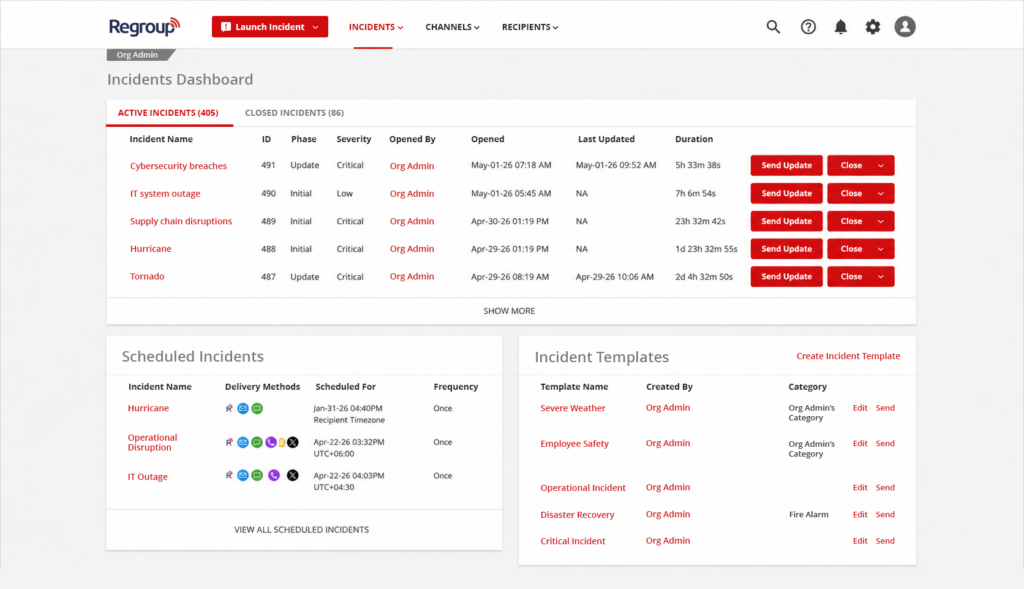
Traditional mass notification systems send messages fast, but they aren’t built to manage an incident as it unfolds. As situations change, teams need to coordinate across departments, adjust messages, and maintain real-time visibility into what’s happening.
Without a dedicated incident management system, organizations often face inconsistent updates, unclear ownership, and limited insight into active response efforts. These gaps can slow decision-making and make it harder to stay in control during high-pressure events.
Incident Management is a Regroup add-on feature that gives teams a dedicated workspace to coordinate critical communications during emergencies or planned events. From one central hub, teams can launch incidents, send updates, assign responsibilities, and track progress in real time.
A Structured Approach to Incident Response
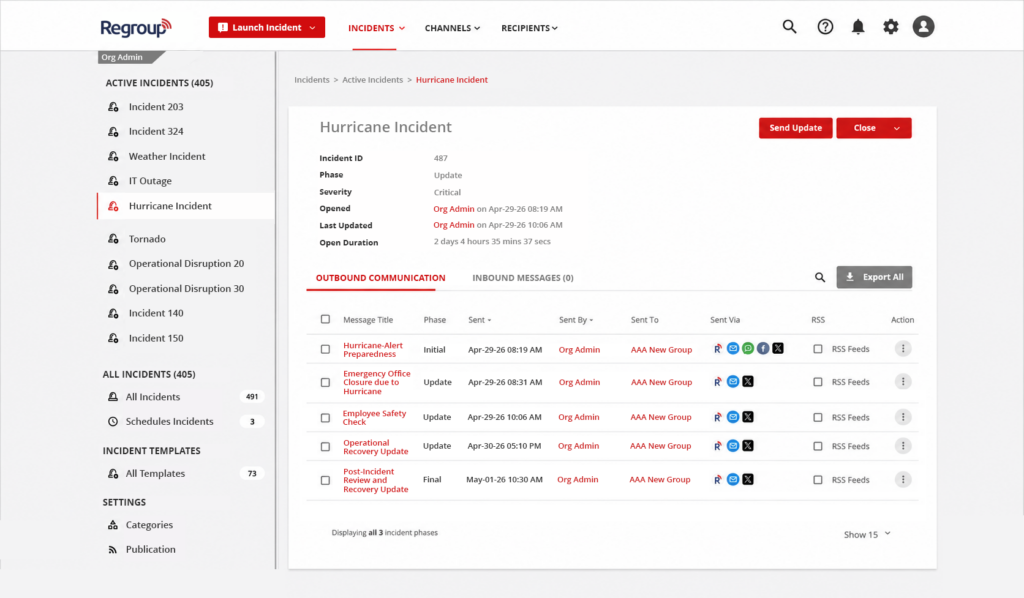
At the core of Incident Management is a clear, repeatable workflow built around a three-phase lifecycle:
- Initial Phase: The first alert is triggered automatically when an incident is launched
- Update Phase: Ongoing notifications are sent as the situation evolves
- Close Phase: Incidents are resolved and formally closed, with the option to send a final communication
Key Features and Capabilities
The Incident Management feature turns emergency communication into a clear, structured workflow. It helps teams keep every step visible, trackable, and aligned.
Key features include:
- Centralized Dashboard: Gain full visibility into incident status, incident category, timelines, severity, and activity
- Role-Based Access Control: Define clear responsibilities with Incident Managers and Operators
- Category Management: Set incident categories —such as Weather, IT, or Operations— to organize responses. This ensures related resources like quick message templates are ready when an incident starts.
- Dynamic Audience Targeting: Adjust recipients as situations evolve to ensure precise communication
- Multi-Channel Delivery: Messages are sent across all communication channels simultaneously
- Templates: Use predefined templates to standardize messaging, pre-configure workflows across all incident phases, and accelerate response times
- Inbound Message Tracking: Replies are organized into categories such as new, follow-up, and closed
- Automation & Integrations: Trigger incidents via API or CAP 1.2 from external systems and devices
- Comprehensive Reporting: Get clear, phase-based insights from initial alerts through updates and final resolution. See delivery performance, engagement, and a complete audit trail for all incident activity.
A Smarter Way to Manage Incidents
Organizations can move beyond simple notifications with Regroup Incident Management and take a more structured approach to incident response.
Clear workflows, centralized communication, and greater visibility help teams respond faster, make better decisions, and stay always in control.
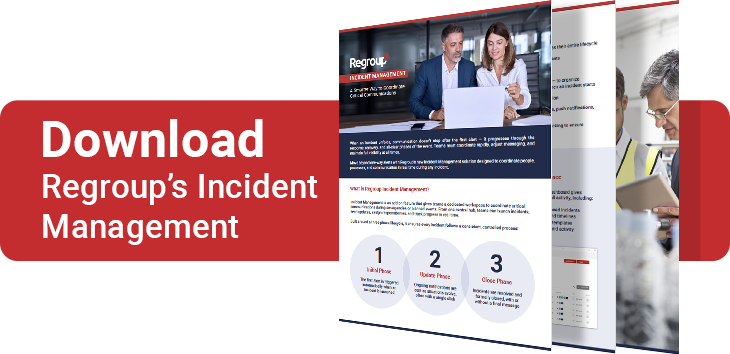
Want to learn more about Incident Management? Let’s connect to discuss how this feature can help you strengthen communication and support your safety goals.
Book a DemoFrequently Asked Questions (FAQs)
What are the benefits of structured incident communications?
Structured incident communications improve clarity, reduce errors, and ensure consistent messaging. Using predefined templates and workflows helps organizations respond faster and maintain control during both emergency and non-emergency situations.
How do Incident Managers and Operators differ?
Incident Managers oversee the entire incident workflow, including templates, categories, and permissions. Incident Operators execute incidents by sending messages, updates, and closures using predefined templates—without modifying the structure.
How do templates, categories, and severity levels streamline incident communication?
Templates standardize messaging, categories organize workflows, and severity levels prioritize response. Together, they create a structured system that improves speed, accuracy, and coordination.
How does Regroup Incident Management integrate with the mass notification system?
Regroup Incident Management integrates seamlessly with Regroup’s system by sharing contacts, groups, and channels. However, it maintains separate communication assets like templates and sender profiles for better control.
Can Regroup Incident Management be used for non-emergency events?
Yes. It supports both planned and unplanned event notifications, including drills, maintenance updates, IT incidents, and operational disruptions.
Table of Contents
- Why Incident Management?
- A Structured Approach to Incident Response
- Key Features and Capabilities
- A Smarter Way to Manage Incidents
- Frequently Asked Questions (FAQs)
- What are the benefits of structured incident communications?
- How do Incident Managers and Operators differ?
- How do templates, categories, and severity levels streamline incident communication?
- How does Regroup Incident Management integrate with the mass notification system?
- Can Regroup Incident Management be used for non-emergency events?
Categories
- Business
- Transportation
- Small Business
- Manufacturing
- Banking Finance
- Disaster Recovery
- Employee Safety
- Routine Communications
- Mass Notification
- Critical Event Management
- Emergency Preparedness
- Corporate
- Insurance
- Business Continuity
- Business Case Studies
- Uncategorized
- Education
- Regroup Product Guides
- Nonprofit
- Healthcare
- Hospitality
- Government & Public Services
- Our Clients
- Awards
- Blog
- COVID-19
- Safety & Preparedness
- News
- Announcements